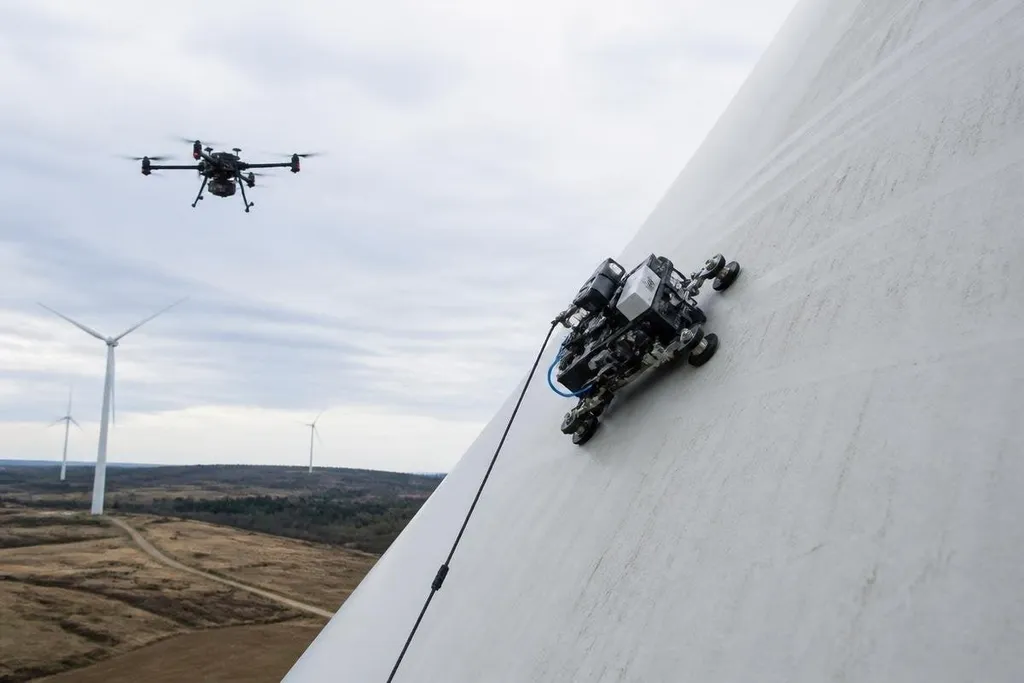
Wind turbine blades spend their working lives in rain, ice, dust, and strong wind. Robots inspect those blades from the air or from the blade surface, helping technicians find cracks, worn coatings, and other faults before repair work begins.
- Drones use cameras to check blade surfaces from a safe distance.
- Crawling robots hold to the blade and inspect areas a drone may miss.
- Software turns images into repair records for technicians.
What the robots look for
A blade inspection starts with the surface. Cameras look for cracks, chips, dents, erosion near the leading edge, and loose or damaged coating. The leading edge faces the wind first, so repeated contact with rain and airborne dust can wear it down.
A drone can fly around a stopped turbine and record images from several angles. Its camera needs enough detail to show a small surface fault, while the pilot or flight system keeps the aircraft clear of the blade. Wind, glare, and poor visibility can make that work harder.
Some inspection systems add thermal cameras. These cameras record heat patterns rather than normal color. A patch with a different heat pattern may point technicians toward a damaged area, but the image still needs human review and often a closer check.
How a blade inspection works
The turbine usually stops before close inspection starts. During the flight, the drone follows a planned route around the blade, taking overlapping images of the pressure side, suction side, leading edge, and trailing edge. Those terms describe the main surfaces and edges of an airfoil-shaped blade.
Image software can sort the pictures by blade section and flag marks for review. That saves technicians from searching through a long flight record by hand. It doesn't decide the repair on its own. A technician still checks the image, compares it with earlier records, and decides whether the fault needs action.
A crawling robot takes a different route. Wheels, tracks, magnets, suction, or a cable system can hold the robot against the blade, depending on the blade material and the robot's design. The robot can carry cameras close to the surface, which helps when a drone cannot get a steady view.
The inspection record matters after the robot leaves. A useful report links each image to a blade position, inspection date, and fault type. That lets a maintenance team compare the same area during later checks instead of starting from a new set of pictures each time.
Reports on wind turbine blade inspection can tie the robot’s route, camera, fault, and review date to each claim. That record shows what the machine checked before the next section looks at where it still falls short.
Where robots still fall short
A drone can't see through the blade shell. A surface image may show a crack, but it cannot confirm the full depth of the damage. Technicians may need ultrasound, tapping tests, or a hands-on check before they approve a repair.
Weather also sets limits. Wind can push a drone away from its route, rain can blur the lens, and ice can hide the surface. A crawling robot faces its own problems if the blade is wet, dirty, sharply curved, or covered with a coating that gives its wheels or suction system poor grip.
Software can flag a mark that turns out to be dirt, a shadow, or a change in paint. It can also miss damage that looks unlike its training examples. I'd treat the software as a sorting tool, not the inspector who signs off the blade.
A practical inspection checklist
Use this checklist when you assess a robotic blade inspection plan:
- Set the inspection target: Decide if the task covers surface wear, cracks, erosion, lightning damage, or another fault type.
- Match the robot to the blade: Check the blade material, curve, coating, and access method before choosing a drone or crawler.
- Check the weather limits: Record the allowed wind, rain, temperature, and visibility range for the robot.
- Keep location data: Tie each image to the blade, edge, section, and inspection date.
- Plan human review: Set a rule for when a technician must inspect a flagged area in person.
- Compare later visits: Store images in a format that lets the team check the same spot again.
That last step turns a single flight into a maintenance record. The useful question is not whether a robot can take pictures; it is whether those pictures help a technician decide what to repair and when.
Until the system can show that link across repeated inspections, the robot remains a way to collect evidence, not a replacement for the inspection team.